Today i started working with video and my model. I have just started learning how to use Fraps and working with ideas on how i want my movie to work. I have also started videoing some small details of animation in my models to get some closes ups on how things work and what doesn't look so good. I have added to these to a YouTube account so here are two links of the first movies i have taken and my developing ideas....
http://www.youtube.com/watch?v=be1r-Z0vnuA&feature=youtu.be
http://www.youtube.com/watch?v=bMYVQA_aTgo&feature=youtu.be
Enjoy :)
Tuesday, 9 October 2012

Week 4: Class 2
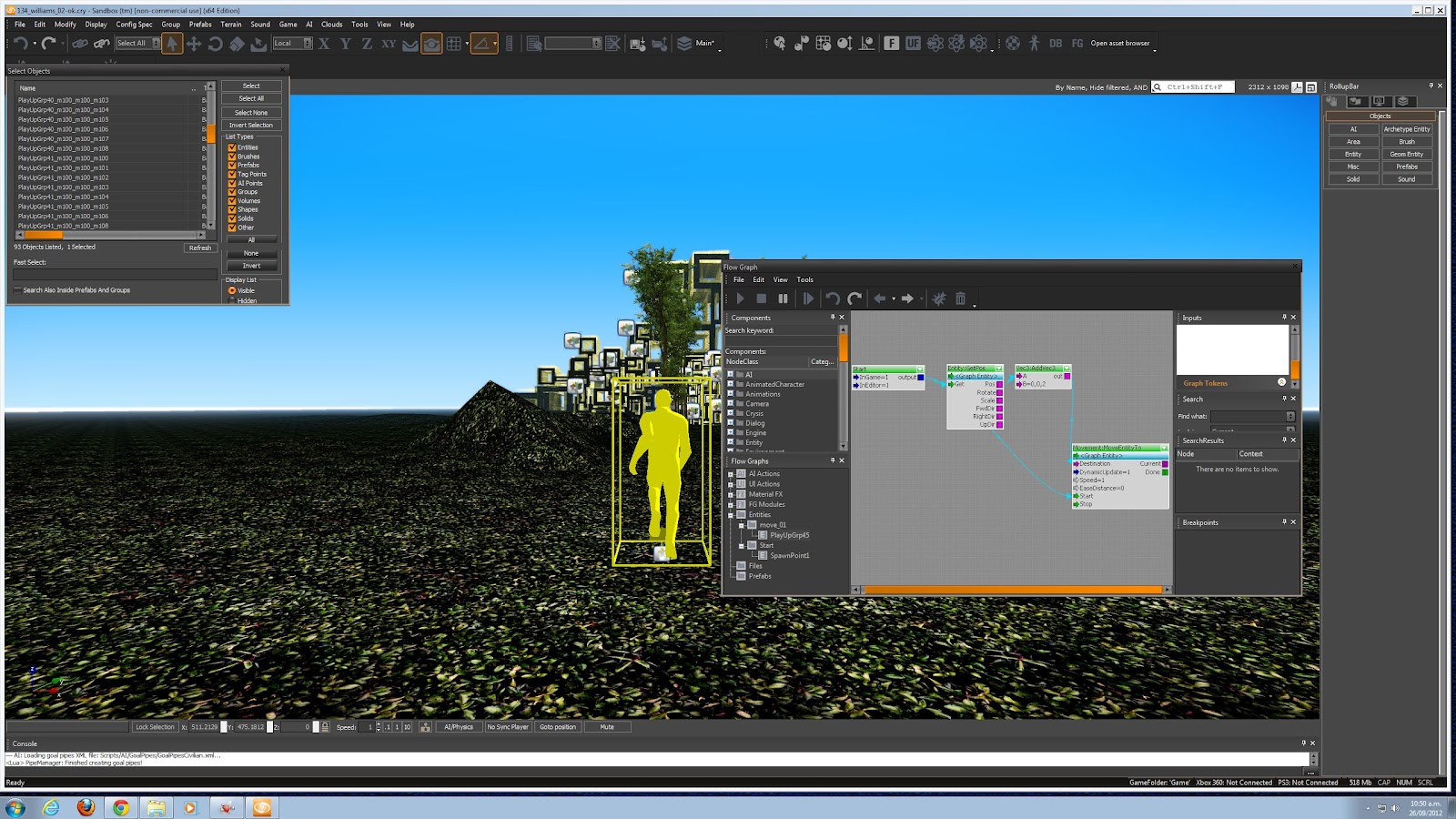
During this class i learnt how to animate one of my models and make it move back and forth. This is the first time i have tried to do this. It worked really well the first time so i have used the same flow graph on more than one of my models. It has added a really good contrast to all of my other models just moving up from underneath the ground. Here is the copy of my flow graph that i made to move them in certain directions and then pull them back.

I have also been developing the first scene of my movie, i wanted it to look like my person was coming out of a full forest shot and into the area where all of my models are. So here is a picture of what my movie will look at the start.


I have also been developing the first scene of my movie, i wanted it to look like my person was coming out of a full forest shot and into the area where all of my models are. So here is a picture of what my movie will look at the start.

Thursday, 4 October 2012
Name ideas for my movie...
I haven't thought too much about the name of my movie because i haven't developed it enough yet for it to even really look like a movie. We also have to incorporate some kind of music back ground, I'm not so sure about this as I'm worried it will change the whole feel of my movie.
I want my movie to be sort of like a dream. Walking into clearing, running from these giant block forms, being relieved once your out. But i don't want to name it something cheesy....
Maybe:
- Block me out
- Giant Dreams
- Dream Scare?
- Block by block..
- Block Monsters...
I think i will talk to my teach about this one :)
I want my movie to be sort of like a dream. Walking into clearing, running from these giant block forms, being relieved once your out. But i don't want to name it something cheesy....
Maybe:
- Block me out
- Giant Dreams
- Dream Scare?
- Block by block..
- Block Monsters...
I think i will talk to my teach about this one :)
Week 4: Class 1 = Glow Texture :)

Wednesday, 3 October 2012
Story Board
Now i know you can't see these pictures very well but lets just pretend you can :)
Basically my idea is to have some walking out into a clearing from a forrest area. They walk out into the space and these giant block forms start coming up from the ground. The person then starts to run past and around them to get away but is getting followed and blocked by them. I can't decide if i want it to end by the person looking back to an empty space again or to look back an see all these huge models (something i will talk to my teacher about). Anyway here is my story board.

 Quite light but :)
Basically my idea is to have some walking out into a clearing from a forrest area. They walk out into the space and these giant block forms start coming up from the ground. The person then starts to run past and around them to get away but is getting followed and blocked by them. I can't decide if i want it to end by the person looking back to an empty space again or to look back an see all these huge models (something i will talk to my teacher about). Anyway here is my story board.


Developing my final movie

Here is an example of that. I am now going to develop a wee drawing of how my movie will go. :)
Thursday, 27 September 2012
Week 3: Class 1


I have also been working on how to animate things on CryEngine and also how to remove the guys gun and all the 'game' settings that are displayed on the screen. Here are some shots of how i did it.

Subscribe to:
Posts (Atom)